⚠️ Security Notice: Our help site was briefly affected by a third-party security incident between Aug 11, 22:26 UTC and Aug 12, 11:04 UTC. If you visited during that window and were prompted to run a "verification command," please read this notice and take action.
ES Spanish
ID Indonesian
TR Turkish
BR Portuguese (Brazil)
JP Japanese
DE German
US English (US)
IN Hindi
TH Thai
FR French
RU Russian
IT Italian

Contact Us

If you still have questions or prefer to get help directly from an agent, please Contact us.
We’ll get back to you as soon as possible.

  • Contact Us
English (US)
ES Spanish
ID Indonesian
TR Turkish
BR Portuguese (Brazil)
JP Japanese
DE German
US English (US)
IN Hindi
TH Thai
FR French
RU Russian
IT Italian
  • Home
  • Managing Your Petition

Delete your petition

Written by Nishanth Chandrasekar

Updated at September 25th, 2026

Contact Us

If you still have questions or prefer to get help directly from an agent, please Contact us.
We’ll get back to you as soon as possible.

  • Getting Started
  • Managing Your Petition
  • Account & Privacy
  • Billing & Membership
  • Signing & Supporting
  • Legal & Compliance
+ More

Table of Contents

Steps to delete your petition Deleting vs. Closing a petition Frequently Asked Questions Why can't I delete my petition myself? Support says they can't find my petition. What should I do?

You can delete a petition you started directly from your Change.org account.

Steps to delete your petition

  1. Log in to your Change.org account. Open Account Settings, then select Manage Signatures, Petitions, Account to open Manage Assets.
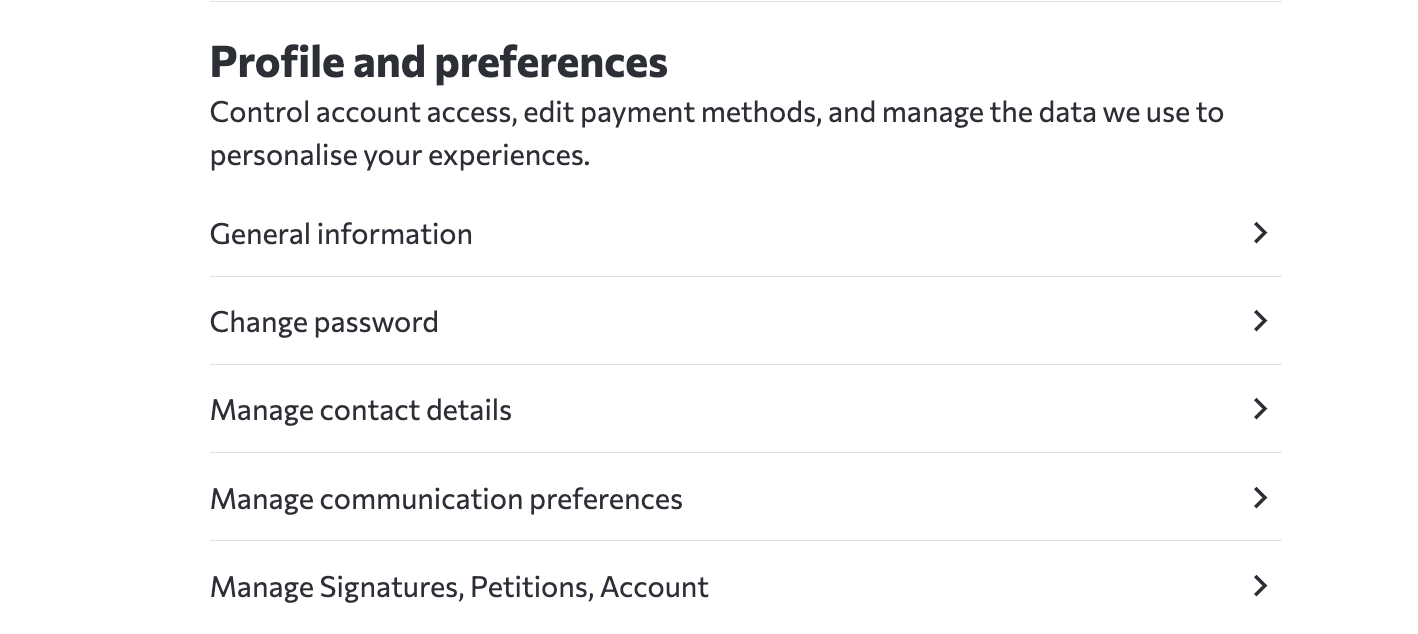
    Account Settings menu with the Manage Signatures, Petitions, Account option
  2. In Manage Assets, find the petition under Started Petitions and select Delete.

    Manage Assets page showing Delete and Restore actions under Started Petitions

What happens after deletion: A deleted petition is removed from public view and search engine indexing, and the deletion action is logged for auditing. You can restore it from Started Petitions in Manage Assets. Petitions with 1,000 or more signatures, or petitions selected by the system for promotion, show an Under Review status while Change.org staff process the request. You retain full edit access to the petition during the review.

Deleting vs. Closing a petition

Deleting a petition removes it from public view and search engine indexing. A deleted petition appears in Manage Assets with a Restore action. If you want to keep your petition visible but stop new signatures, you can close it from your petition dashboard. When you close a petition:

● The petition remains visible on Change.org

● No new signatures can be added

● You can reopen it later

● Your petition remains visible, and the media may contact you in case of any inquiries or interviews

Frequently Asked Questions

Why is my deletion request under review?

A deletion request shows Under Review when the petition has 1,000 or more signatures or the system selected it for promotion. Change.org staff process the request, and you retain full edit access to the petition during the review.

How do I restore a deleted petition?

Go to Manage Assets. Under Started Petitions, find the deleted petition and select Restore.

withdraw cancel

Related Articles

  • Edit your petition
  • Post updates to supporters
  • Share your petition
  • Understand signature counts and why they fluctuate
  • Download your signatures

  • Company

  • About
  • Impact
  • Careers
  • Team
  • Community

  • Blog
  • Press
  • Community Guidelines
  • Support

  • Help
  • Guides
  • Privacy
  • Policies
  • Cookies
  • Connect

  • Twitter
  • Facebook

  • © 2024, Change.org, PBC
  • This site is protected by reCAPTCHA and the Google Privacy Policy and Terms of Service apply.

Knowledge Base Software powered by Helpjuice

Expand